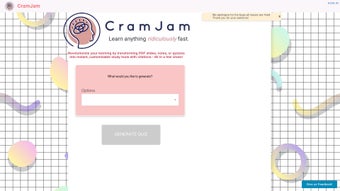

Download CramJam – AI-Powered Personalized Quiz Generator for Smarter Learning
CramJam is a powerful, AI-driven learning tool that transforms the way students and educators create and use quizzes. Designed to help users study smarter, CramJam generates personalized quizzes based on any subject or topic you choose. Whether you're preparing for exams, teaching a class, or mastering a new skill, this software leverages advanced artificial intelligence to deliver targeted, adaptive questions that reinforce retention and improve comprehension.
With CramJam, you can turn your notes, textbooks, or even voice recordings into dynamic quiz content in seconds. The platform supports active learning, making it easier to test knowledge, identify weak areas, and track progress over time. Ideal for learners across all levels—from high school to professional certification prep—CramJam is gaining popularity on platforms like Product Hunt for its intuitive design and efficiency.
While it currently lacks offline access and multi-user collaboration features, its strengths in speed, customization, and ease of use make it a standout choice for anyone serious about optimizing their study routine.
Key Features of CramJam: What Makes It Stand Out
CramJam’s core strength lies in its ability to generate high-quality, personalized quizzes using artificial intelligence. Unlike traditional flashcard apps or static quiz generators, CramJam analyzes your input—whether it’s a paragraph, a lecture summary, or a list of topics—and transforms it into a dynamic set of questions tailored to your learning style and knowledge level. This AI-powered engine ensures that each quiz is not just random but strategically designed to challenge your understanding and highlight knowledge gaps. For example, if you're studying biology and input a chapter on photosynthesis, CramJam will generate multiple-choice, true/false, and short-answer questions that test both factual recall and conceptual understanding.
Another standout feature is its topic-specific customization. You can specify the difficulty level, question types, and even the focus areas—such as “memorization,” “application,” or “critical thinking”—to align the quiz with your study goals. This level of control makes CramJam perfect for educators who want to create classroom assessments or for students preparing for specific exam formats like the MCAT, SAT, or GRE. Additionally, the tool supports multi-format outputs, allowing you to export quizzes as PDFs, share them via links, or import them into other learning platforms like Quizlet or Google Classroom.
With real-time feedback and instant scoring, CramJam helps users learn immediately after answering each question. This immediate reinforcement strengthens memory retention and encourages deeper engagement. The tool also remembers your performance history, enabling it to adjust future quiz difficulty dynamically. Whether you're a visual learner, auditory learner, or someone who benefits from spaced repetition, CramJam adapts to your needs. These features combine to make CramJam not just a quiz generator, but a complete learning companion that supports long-term knowledge building.
How to Install and Use CramJam: A Step-by-Step Guide
Getting started with CramJam is quick and straightforward, requiring no technical expertise. To begin, visit the official website and click on the “Download” or “Start Free” button. The tool is accessible via web browser, so there’s no need for complex installation. Simply sign up with your email or Google account, and you’ll be redirected to your dashboard within seconds. The clean, intuitive interface ensures that even first-time users can navigate effortlessly.
Once logged in, you’ll see the main screen where you can start creating your first quiz. Click on the “Create New Quiz” button, then choose your preferred input method: paste text, upload a document (PDF, DOCX), or record a voice note. For instance, if you’re studying psychology and have a 5-page lecture summary, simply paste the text into the editor. CramJam’s AI will scan the content and automatically extract key concepts, definitions, and relationships to build a comprehensive quiz.
Next, customize your quiz by selecting the question type (multiple choice, true/false, fill-in-the-blank), difficulty level (easy, medium, hard), and focus area (recall, application, analysis). You can also set the number of questions—ranging from 5 to 50—depending on your study session length. Once configured, click “Generate” and wait just a few seconds. The quiz appears instantly, complete with answer explanations and performance tracking.
After completing the quiz, you’ll receive a detailed report showing your score, time spent, and areas where you struggled. You can review incorrect answers with AI-generated explanations and even save the quiz for future revision. For educators, the platform allows exporting quizzes in various formats or sharing them via a secure link with students. With no installation required and a responsive design that works on desktop, tablet, and mobile devices, CramJam is truly accessible anytime, anywhere.
Compatibility and System Requirements
CramJam is a cloud-based software application, which means it doesn’t require any installation or specific system configuration. As long as you have a modern web browser and a stable internet connection, you can use CramJam on virtually any device. It is fully compatible with Windows, Mac, Android, and iOS, making it an excellent choice for learners who switch between devices throughout the day.
For desktop users, CramJam supports the latest versions of Chrome, Firefox, Safari, and Edge. On mobile, the app is optimized for both Android and iOS smartphones and tablets, with a responsive interface that adapts seamlessly to different screen sizes. Whether you're using a MacBook Pro, an iPad, a Samsung Galaxy phone, or a Windows laptop, the experience remains consistent and smooth.
Since CramJam runs entirely in the browser, it doesn’t consume local storage or processing power, which is ideal for older devices or those with limited RAM. This also means you can access your quizzes and study history from any location—whether you’re at home, in the library, or on the go. The platform automatically syncs your data across devices, so your progress is always up to date.
Security is a top priority. All user data is encrypted in transit and at rest, and CramJam does not store sensitive information like passwords or personal documents beyond what’s necessary. The platform complies with industry standards for data privacy, including GDPR and CCPA, ensuring your learning content remains private and secure. With regular updates to improve performance and add new features, CramJam continues to evolve as a reliable, future-proof learning tool.
Pros and Cons of Using CramJam
Pros
- AI-Powered Personalization – Generates quizzes tailored to your input and learning level, improving retention and engagement.
- Fast & Effortless Creation – Turn notes or text into quizzes in seconds with minimal effort.
- Multiple Question Types – Supports multiple choice, true/false, fill-in-the-blank, and short answer for diverse learning styles.
- Real-Time Feedback – Instant scoring and detailed explanations help users learn from mistakes immediately.
- Multi-Device Access – Works seamlessly on Windows, Mac, Android, and iOS without installation.
- Secure & Private – Data encryption and compliance with privacy regulations ensure your content stays safe.
Cons
- No Offline Mode – Requires internet access to use, which can be a limitation in low-connectivity areas.
- Limited Multi-User Features – Not designed for team collaboration or shared classroom management.
- No Built-in Progress Tracking – While it tracks quiz performance, long-term learning progress isn’t visualized in a dashboard.
- Free Version Has Limits – The free tier restricts quiz length and number of exports.
- Dependent on Input Quality – The output depends on how well you structure your input text or notes.
Frequently Asked Questions (FAQ)
Final Verdict: Why CramJam Is a Must-Try Learning Tool
CramJam stands out as one of the most intelligent and efficient quiz generation tools available today. Its AI-driven approach to personalized learning makes it an invaluable asset for students, teachers, and lifelong learners. By transforming raw study material into interactive, adaptive quizzes, CramJam turns passive reading into active learning—proven to boost memory and understanding. The platform’s ease of use, cross-device compatibility, and strong security make it a reliable choice for anyone serious about improving their study habits.
While it does have some limitations—like the lack of offline access and multi-user features—the benefits far outweigh the drawbacks for individual users. If you're looking to download a free, secure, and powerful learning tool that helps you study smarter, not harder, CramJam is definitely worth trying. Whether you're cramming for finals or building a long-term knowledge base, this software delivers real value in minutes.
Ready to transform your learning journey? Download CramJam today and start generating personalized quizzes in seconds!



.png)



